Welcome to the May update!
We’ve focused heavily on deepening platform integration, introducing smarter AI-driven logic, and giving enterprise teams much greater execution flexibility.
Across our services, we are breaking down silos and accelerating your daily testing rhythms. In Web Testing, we’ve unlocked real-time locator access for seamless SAP scripting and rolled out major intelligence and speed upgrades to Test Generator v2. Desktop Testing sees an influx of pipeline capability with brand-new Jenkins and Azure DevOps plugins, alongside powerful new session persistence that lets you connect directly to existing SAP windows.
Meanwhile, our underlying infrastructure continues to mature. Test Orchestration has been completely decoupled from individual module licensing to act as a truly independent layer, while also gaining folder-level scheduling to streamline batch execution. We’ve also fortified our mobile capabilities with massive stability upgrades to iOS device streaming, and extended qAPI’s enterprise reach with robust Node CLI enhancements and clearer project management tracking.
Let’s dive right into the full details of all the powerful new capabilities available on the Qyrus platform.
Web Testing
Flawless Connections: Enhanced iOS Device Streaming!
The Challenge:
When using Test Generator v2 to automatically build test scenarios via integrations, any friction in the generation flow ruins the speed advantage of using AI. Previously, users faced two major hurdles: the initial streaming API could experience a bottleneck—taking up to two minutes just to return a “Generating” status—and auto-generated variable actions lacked structural logic. If a script required multiple variables (e.g., Var 1 through Var 5), the AI didn’t automatically cross-reference its memory to intelligently link those variables to subsequent data handler steps, forcing testers to manually patch the logic. Additionally, path values for generated steps were buried, making it tedious to audit the AI’s structural paths.
The Fix:
We have rolled out critical enhancements to Test Generator v2 to optimize both backend performance and AI logic. We dramatically accelerated the initial stream API response time, slashing the latency required to initiate a generation job. On the intelligence front, the AI now automatically names variables inside the “Create Variable” action and intelligently maps those identical variable names to corresponding downstream data handler actions (such as Dynamic Set steps) by referencing its historical memory. Finally, we have explicitly included the exact path values right inside the info section of every step TG generates.
How will it help?
These intelligence and speed optimizations turn AI generation into a fluid, hands-off experience.
- Instant Generation: No more waiting on spinning wheels. The optimized streaming API kicks off your AI generation jobs almost instantly, accelerating your overall testing velocity.
- Flawless End-to-End Variable Logic: The AI now handles multi-variable data mapping seamlessly. If your test scenario creates five variables, the system automatically tracks them in its memory and binds the correct variable to subsequent dynamic steps without manual intervention.
- Transparent Step Auditing: With path values clearly visible in the info section of each generated step, you can immediately inspect, verify, and debug the exact navigation paths the AI mapped out.
Seamless SAP Scripting: Real-Time Locator Access!
The Challenge:
Building automated tests for complex SAP web interfaces (like SAP Fiori) requires highly specific, often intricate element locators. Previously, gathering these unique SAP locators meant testers had to frequently break their workflow—jumping between separate recording sessions, external inspection tools, or complex documentation just to copy and paste the correct identifiers into their test steps. This context-switching drastically slowed down the test creation process and increased the risk of manual errors.
The Fix:
We have fully integrated SAP Recorded Locators directly into the Web Testing builder. Now, while you are actively constructing your test steps on the canvas, you have immediate, real-time access to the specialized SAP locators you need without ever having to leave the test building interface.
How will it help?
This workflow enhancement removes the friction of testing complex SAP environments.
- Accelerated Test Building: Say goodbye to context-switching. You can now design, configure, and assign the correct SAP locators fluidly within a single, unified workspace.
- Pinpoint Accuracy: By pulling recorded locators directly into your builder, you significantly reduce the risk of typos or incorrect element identification, ensuring your tests are robust from the start.
- Developer-Friendly Experience: This seamless integration makes building complex SAP web tests faster, more intuitive, and far less tedious for your automation engineers.
Desktop Testing
Seamless CI/CD Integration: Jenkins & Azure Plugins for Desktop Testing!
The Challenge:
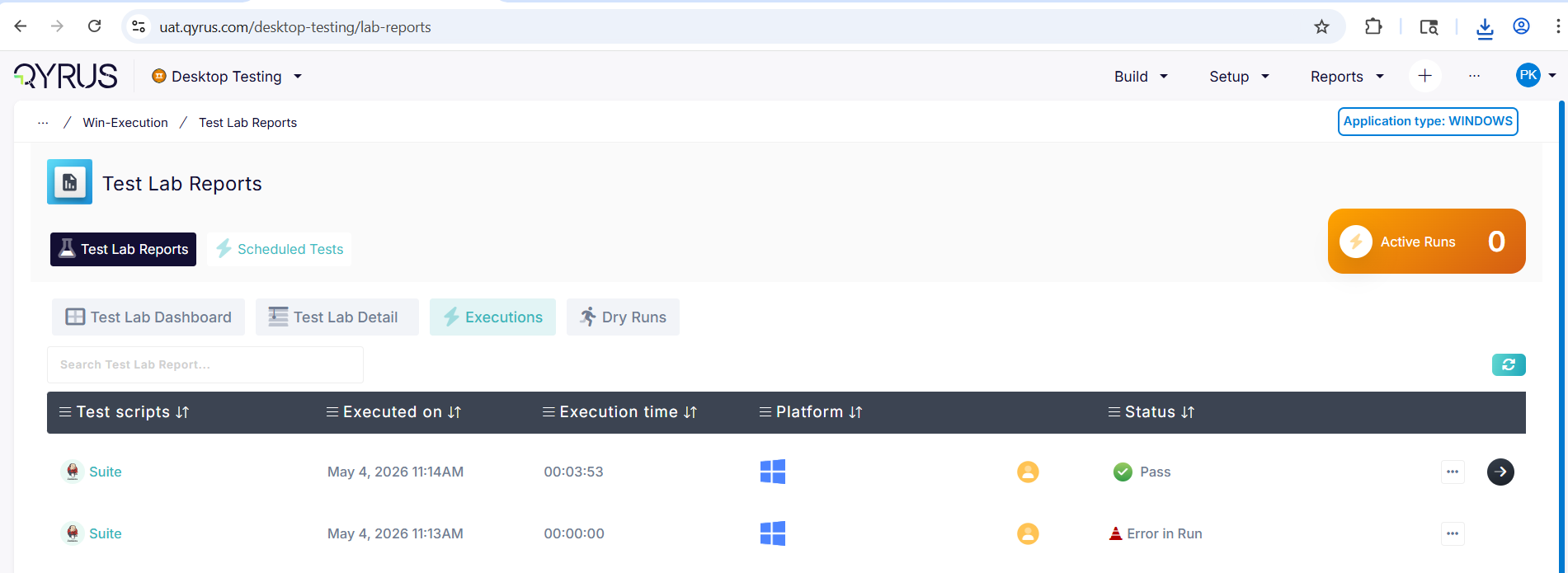
As organizations modernize their deployment pipelines, manual testing interventions create significant bottlenecks. Previously, triggering automated scripts for Desktop applications required users to step outside of their primary CI/CD workflows. Without native plugins for popular orchestration tools, teams had to rely on cumbersome manual triggers or complex, custom-built scripts to initiate their Desktop Testing suites, resulting in disjointed delivery pipelines and slower release cycles.
The Fix:
We have officially introduced dedicated Jenkins and Azure DevOps plugins specifically for the Desktop Testing Service. These new plugins empower you to seamlessly trigger and manage your automated desktop application scripts directly from your existing CI/CD pipelines, bringing the service up to parity with our Web, API, and Mobile testing offerings.
How will it help?
This integration bridges the gap between your desktop application builds and your automated testing ecosystem.
- Unified Workflows: Manage your entire testing strategy—across Web, Mobile, API, and now Desktop—from a centralized CI/CD control plane.
- Frictionless Automation: Automatically execute robust desktop automation scripts the moment a new build is deployed, eliminating manual handoffs and accelerating your time-to-market.
- Developer Flexibility: Empower your engineering teams to seamlessly embed desktop quality gates into the familiar Jenkins or Azure environments they already use every day.
Continuous Execution: Connect to Existing SAP Windows!
The Challenge:
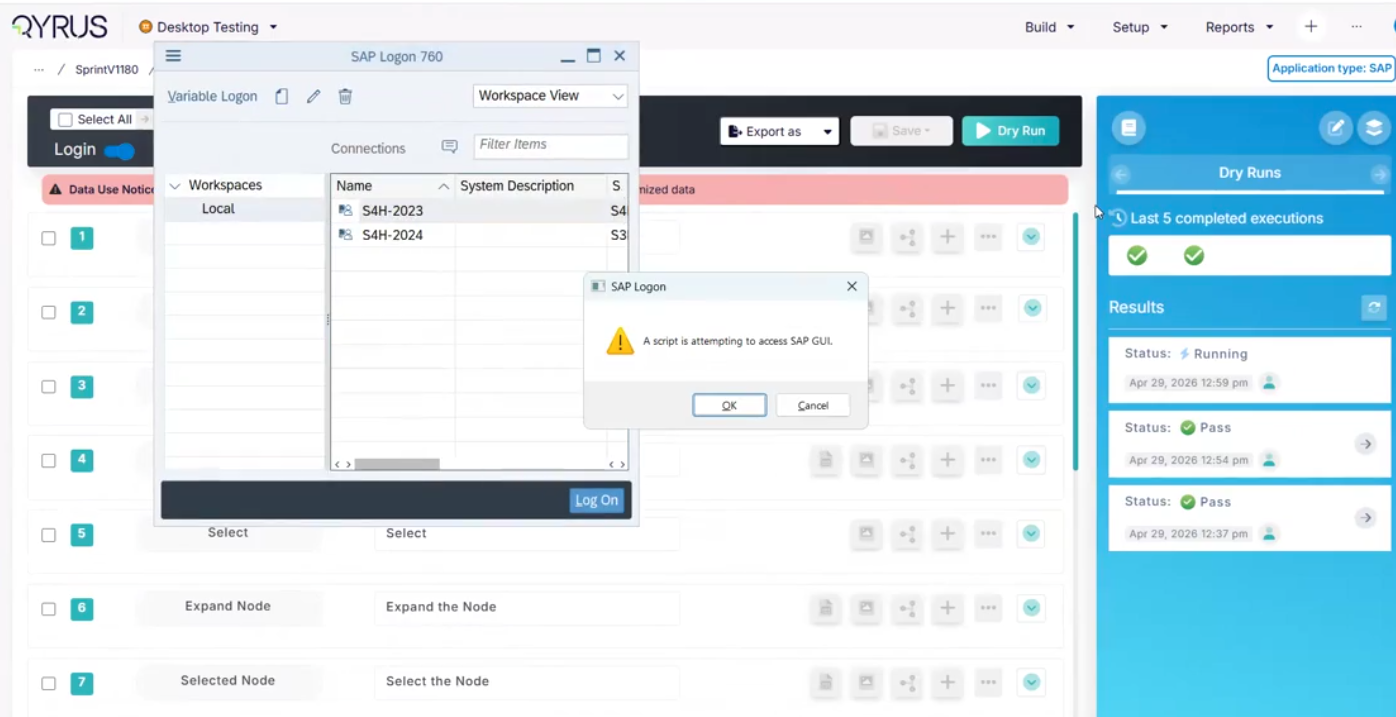
When automating complex desktop workflows within SAP GUI, test scripts traditionally forced a brand-new application instance to launch for every execution. If a test failed midway or if an engineer wanted to resume a specific sequence after manual intervention, they were forced to restart the entire SAP login and navigation flow from scratch. This rigid behavior created duplicate windows, consumed unnecessary system resources, and drastically slowed down test debugging and multi-step process validations.
The Fix:
We have implemented powerful session persistence capabilities within the Desktop Testing Service. Using a robust “attach-to-window” mechanism for Windows environments, we’ve introduced a dedicated ‘Connect To Existing SAP Window’ action. This allows your desktop automation to intelligently detect and hook into an already-open SAP session instead of triggering a fresh launch.
How will it help?
This workflow upgrade brings true continuity to your desktop SAP automation.
- Resume Without Restarting: Easily continue an automation flow exactly where it left off, or seamlessly transition between manual steps and automated executions without losing your session state.
- Optimize System Resources: Prevent your desktop environment from being cluttered with redundant, duplicate SAP application instances during iterative testing and debugging.
- Accelerate Debugging: By bypassing the initial login and navigation sequences, automation engineers can rapidly test and refine specific downstream actions directly within an active SAP window.
Secure & Streamlined: QloudBridge Encryption & Login Upgrades!
The Challenge:
QloudBridge acts as the vital tunnel connecting your local desktop environments to the Qyrus cloud platform. Any weakness in how this data is encrypted during transit poses a significant security risk for enterprise teams handling sensitive test data. Additionally, a clunky or unstable login flow creates unnecessary friction when engineers are trying to spin up local testing sessions. When underlying build issues cause these connections to drop unexpectedly, it disrupts automated runs and delays the entire testing cycle.
The Fix:
We have significantly enhanced the QloudBridge security architecture by rolling out updated, enterprise-grade encryption protocols alongside a completely refined, smoother login flow. In tandem with these security hardening measures, we have successfully resolved underlying infrastructure and build bottlenecks that were previously causing minor connection instability. These updates have been fully verified on our staging environments and are operating exactly as expected.
How will it help?
This underlying infrastructure update provides a more resilient and secure testing foundation.
- Hardened Data Security: Your local test data and application traffic are now protected by even stronger encryption during transit, satisfying the most rigorous enterprise compliance standards.
- Seamless Authentication: The improved login flow makes it faster and significantly more intuitive to authenticate and connect your local machine to the platform, removing friction from your daily workflow.
- Unshakeable Stability: By resolving the core infrastructure issues, we’ve ensured a highly reliable, persistent connection that won’t unexpectedly drop during your long-running desktop automation suites.
Device Farm
Flawless Connections: Enhanced iOS Device Streaming!
The Challenge:
Interacting with cloud-hosted iOS devices could sometimes suffer from slight video latency, dropped frames, or momentary disconnections during intense manual testing sessions or heavy automated runs. This streaming instability caused frustration, making it difficult to test UI responsiveness accurately or to confidently debug complex touch interactions on Apple hardware.
The Fix:
We have implemented major infrastructure upgrades to the device streaming protocol specifically for iOS device sessions. This includes optimized video encoding and a much more resilient connection architecture to ensure a rock-solid, high-definition stream between the physical iPhones and iPads in our data center and your local browser.
How will it help?
This underlying upgrade makes remote iOS testing feel like the device is sitting right on your desk.
- Silky Smooth Manual Testing: Experience near-zero latency when interacting with remote iOS devices, allowing for precise gestures, swipes, and taps without frustrating delays.
- Rock-Solid Stability: Say goodbye to dropped sessions and frozen screens. The hardened connection ensures uninterrupted testing, even during extended, deep-dive debugging workflows.
- Accurate UI Validation: A crystal-clear, lag-free stream means you can confidently validate animations, transitions, and overall application responsiveness without the interference of network jitter.
Test Orchestration
Independent Orchestration: Decoupled Licensing!
The Challenge:
Previously, using Test Orchestration (TO) was strictly tied to your active module licenses for Web, Mobile, API, or Desktop testing. If one of those underlying service licenses expired or became inactive, it created a hard functional blocker within TO—even for users whose primary role was just to build and manage orchestrated workflows. This rigid dependency disrupted continuous testing strategies and unnecessarily complicated license management across large QA teams.
The Fix:
We have completely decoupled Test Orchestration from these underlying service-module dependencies. TO now operates as a fully independent orchestration layer. You can seamlessly build, manage, and execute orchestration scripts without requiring active Web, Mobile, API, or Desktop module licenses. Crucially, the platform still securely respects your existing role-based access controls (RBAC) and accurately governs execution capacity based purely on your available Browser and Mobile execution inventory.
How will it help?
This licensing update provides greater flexibility and removes arbitrary administrative blockers from your orchestration workflows.
- Uninterrupted Orchestration: Continue building, managing, and executing your complex test flows without unexpected access blocks caused by individual module license expirations.
- Streamlined Team Access: QA managers and orchestration engineers can now freely utilize the TO workspace to coordinate overarching test strategies without consuming individual service-module licenses.
- Resource-Based Scaling: Scale your orchestrations naturally based on your actual execution capacity (Browser/Mobile slots) rather than being restricted by module-level licensing.
Batch Execution: Folder-Level Scheduling!
The Challenge:
Managing and scheduling large test suites can quickly become an administrative burden. Previously, if you wanted to schedule a group of related workflows to run at the same time, you had to configure the scheduling parameters for each workflow individually. This repetitive process was not only tedious and time-consuming but also increased the risk of manual configuration errors across your test batches.
The Fix:
We have introduced a powerful new Folder-level Scheduler within Test Orchestration. Instead of managing individual scripts one by one, you can now apply a single scheduling configuration to an entire folder. This instantly schedules multiple workflows contained within that folder to execute using the exact same parameters.
How will it help?
This enhancement dramatically simplifies the administration of massive test suites.
- Massive Time Savings: Eliminate repetitive setup tasks by configuring the schedule once at the folder level, instantly applying it to dozens of underlying workflows.
- Guaranteed Consistency: Ensure that all related tests in a specific batch run with the exact same configurations, environments, and timing rules, eliminating configuration drift.
- Effortless Scalability: As your test suites grow, managing execution schedules remains simple and organized by leveraging your existing folder hierarchies.
qAPI Product Release Update
Enterprise-Ready Execution: Node CLI Plugin Upgrades for qAPI!
The Challenge:
Managing API performance and functional testing via command-line interfaces across large, enterprise-level teams can get complicated. Previously, fetching project details via the CLI relied on user email addresses, which didn’t scale well within complex enterprise structures where team-based access is the standard. Furthermore, sharing the results of CLI-triggered test runs often involved manual data extraction or wrestling with clunky file sharing, creating friction for teams trying to review execution reports quickly.
The Fix:
We have significantly upgraded the Node CLI Plugin for qAPI to better support enterprise workflows. First, we transitioned project fetching from user emails to team IDs (/projects?teamId), perfectly aligning the CLI with robust, enterprise-grade project management structures. We also introduced a new feature (/get-reports-url) that automatically generates a secure CDN link for your execution reports—valid for seven days—directly from the command line.
How will it help?
These CLI enhancements streamline headless API testing for large-scale engineering teams.
- Enterprise-Scale Management: Fetching project data based on Team ID ensures the CLI integrates flawlessly with complex organizational structures and role-based access configurations.
- Instant Report Sharing: Automatically generate secure, temporary CDN URLs for your test reports straight from the CLI, making it incredibly simple to share results with your team or attach them to build logs.
- Streamlined Automation: With a dedicated CLI plugin type and x-api-key support for URL generation, building secure, automated qAPI testing pipelines into your CI/CD processes is smoother than ever.
Seamless Navigation: Enhanced Project Listing!
The Challenge:
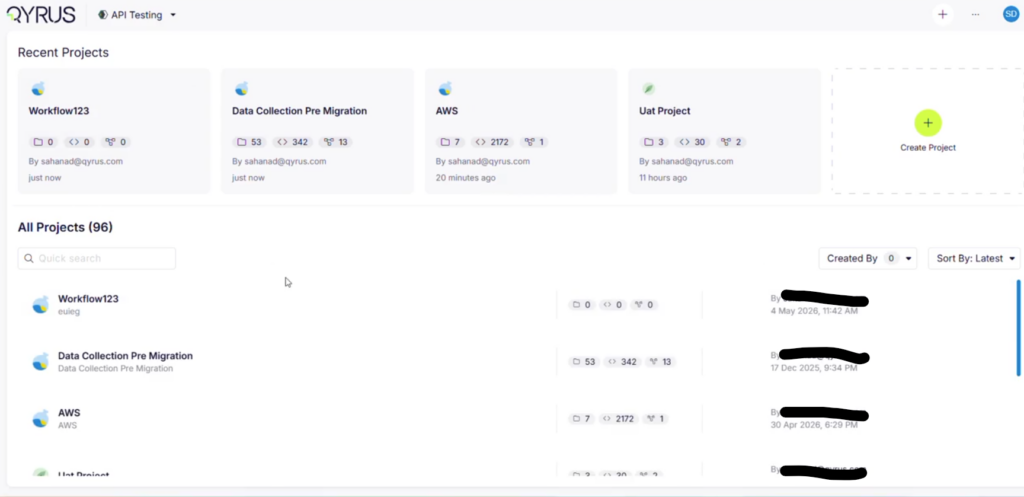
As enterprise teams scale their API testing footprints, the number of active projects can grow rapidly into the dozens or hundreds. Previously, the qAPI dashboard restricted the project view—only loading the first page of 15 projects and preventing users from scrolling or navigating to see the rest of their portfolio. This forced teams to rely on direct links or search workarounds just to access older or lower-priority projects.
The Fix:
We have resolved this limitation by overhauling the data-fetching and pagination logic within the qAPI project dashboard. Following successful validation in our staging environments, the fix is fully deployed, ensuring that your complete catalog of projects now loads fluidly and accurately across all pages.
How will it help?
This fix restores complete visibility and smooth navigation to your workspace.
- Full Portfolio Visibility: Effortlessly browse through your entire history of API testing projects without arbitrary UI cutoffs or missing entries.
- Frictionless Browsing: Experience smooth, reliable page loading as you scroll through large collections of enterprise projects.
- Better Team Coordination: Large testing teams can now confidently organize and locate their respective projects from a single, uncompromised dashboard view.
Enhanced Traceability: Script-Level Xray Visibility within Suites!
The Challenge:
When managing large API test suites integrated with Jira Xray, it can be difficult to track which individual scripts are properly linked to your test management tools. Since Xray determines suite execution status based on its underlying linked scripts rather than a standalone suite-level configuration, testers previously had to open each script individually to verify its Xray integration details. This lack of centralized visibility made auditing large test suites time-consuming and error-prone.
The Fix:
We have enhanced the visibility of Xray integration configurations directly within the qAPI test suite view. While direct suite-level configuration isn’t native to Xray, you can now click the integration icon at the suite level to immediately view a clear breakdown of the linked scripts alongside their respective Xray integration details and script names.
How will it help?
This update centralizes your integration tracking, making test management much more transparent.
- Centralized Integration Audits: Instantly verify which scripts within a suite are correctly mapped to Xray without toggling back and forth between individual script configurations.
- Clear Execution Mapping: Easily understand how your suite-level execution status will flow back to Jira based on a clear visual summary of its underlying scripts.
- Streamlined Troubleshooting: Quickly identify unlinked or misconfigured scripts directly from the high-level suite overview, keeping your test management system perfectly synchronized.
Flawless Connections: Enhanced iOS Device Streaming!
The Challenge:
When using Test Generator v2 to automatically build test scenarios via integrations, any friction in the generation flow ruins the speed advantage of using AI. Previously, users faced two major hurdles: the initial streaming API could experience a bottleneck—taking up to two minutes just to return a “Generating” status—and auto-generated variable actions lacked structural logic. If a script required multiple variables (e.g., Var 1 through Var 5), the AI didn’t automatically cross-reference its memory to intelligently link those variables to subsequent data handler steps, forcing testers to manually patch the logic. Additionally, path values for generated steps were buried, making it tedious to audit the AI’s structural paths.
The Fix:
We have rolled out critical enhancements to Test Generator v2 to optimize both backend performance and AI logic. We dramatically accelerated the initial stream API response time, slashing the latency required to initiate a generation job. On the intelligence front, the AI now automatically names variables inside the “Create Variable” action and intelligently maps those identical variable names to corresponding downstream data handler actions (such as Dynamic Set steps) by referencing its historical memory. Finally, we have explicitly included the exact path values right inside the info section of every step TG generates.
How will it help?
These intelligence and speed optimizations turn AI generation into a fluid, hands-off experience.
- Instant Generation: No more waiting on spinning wheels. The optimized streaming API kicks off your AI generation jobs almost instantly, accelerating your overall testing velocity.
- Flawless End-to-End Variable Logic: The AI now handles multi-variable data mapping seamlessly. If your test scenario creates five variables, the system automatically tracks them in its memory and binds the correct variable to subsequent dynamic steps without manual intervention.
- Transparent Step Auditing: With path values clearly visible in the info section of each generated step, you can immediately inspect, verify, and debug the exact navigation paths the AI mapped out.
Seamless SAP Scripting: Real-Time Locator Access!
The Challenge:
Building automated tests for complex SAP web interfaces (like SAP Fiori) requires highly specific, often intricate element locators. Previously, gathering these unique SAP locators meant testers had to frequently break their workflow—jumping between separate recording sessions, external inspection tools, or complex documentation just to copy and paste the correct identifiers into their test steps. This context-switching drastically slowed down the test creation process and increased the risk of manual errors.
The Fix:
We have fully integrated SAP Recorded Locators directly into the Web Testing builder. Now, while you are actively constructing your test steps on the canvas, you have immediate, real-time access to the specialized SAP locators you need without ever having to leave the test building interface.
How will it help?
This workflow enhancement removes the friction of testing complex SAP environments.
- Accelerated Test Building: Say goodbye to context-switching. You can now design, configure, and assign the correct SAP locators fluidly within a single, unified workspace.
- Pinpoint Accuracy: By pulling recorded locators directly into your builder, you significantly reduce the risk of typos or incorrect element identification, ensuring your tests are robust from the start.
- Developer-Friendly Experience: This seamless integration makes building complex SAP web tests faster, more intuitive, and far less tedious for your automation engineers.
Seamless CI/CD Integration: Jenkins & Azure Plugins for Desktop Testing!
The Challenge:
As organizations modernize their deployment pipelines, manual testing interventions create significant bottlenecks. Previously, triggering automated scripts for Desktop applications required users to step outside of their primary CI/CD workflows. Without native plugins for popular orchestration tools, teams had to rely on cumbersome manual triggers or complex, custom-built scripts to initiate their Desktop Testing suites, resulting in disjointed delivery pipelines and slower release cycles.
The Fix:
We have officially introduced dedicated Jenkins and Azure DevOps plugins specifically for the Desktop Testing Service. These new plugins empower you to seamlessly trigger and manage your automated desktop application scripts directly from your existing CI/CD pipelines, bringing the service up to parity with our Web, API, and Mobile testing offerings.
How will it help?
This integration bridges the gap between your desktop application builds and your automated testing ecosystem.
- Unified Workflows: Manage your entire testing strategy—across Web, Mobile, API, and now Desktop—from a centralized CI/CD control plane.
- Frictionless Automation: Automatically execute robust desktop automation scripts the moment a new build is deployed, eliminating manual handoffs and accelerating your time-to-market.
- Developer Flexibility: Empower your engineering teams to seamlessly embed desktop quality gates into the familiar Jenkins or Azure environments they already use every day.
Continuous Execution: Connect to Existing SAP Windows!
The Challenge:
When automating complex desktop workflows within SAP GUI, test scripts traditionally forced a brand-new application instance to launch for every execution. If a test failed midway or if an engineer wanted to resume a specific sequence after manual intervention, they were forced to restart the entire SAP login and navigation flow from scratch. This rigid behavior created duplicate windows, consumed unnecessary system resources, and drastically slowed down test debugging and multi-step process validations.
The Fix:
We have implemented powerful session persistence capabilities within the Desktop Testing Service. Using a robust “attach-to-window” mechanism for Windows environments, we’ve introduced a dedicated ‘Connect To Existing SAP Window’ action. This allows your desktop automation to intelligently detect and hook into an already-open SAP session instead of triggering a fresh launch.
How will it help?
This workflow upgrade brings true continuity to your desktop SAP automation.
- Resume Without Restarting: Easily continue an automation flow exactly where it left off, or seamlessly transition between manual steps and automated executions without losing your session state.
- Optimize System Resources: Prevent your desktop environment from being cluttered with redundant, duplicate SAP application instances during iterative testing and debugging.
- Accelerate Debugging: By bypassing the initial login and navigation sequences, automation engineers can rapidly test and refine specific downstream actions directly within an active SAP window.
Secure & Streamlined: QloudBridge Encryption & Login Upgrades!
The Challenge:
QloudBridge acts as the vital tunnel connecting your local desktop environments to the Qyrus cloud platform. Any weakness in how this data is encrypted during transit poses a significant security risk for enterprise teams handling sensitive test data. Additionally, a clunky or unstable login flow creates unnecessary friction when engineers are trying to spin up local testing sessions. When underlying build issues cause these connections to drop unexpectedly, it disrupts automated runs and delays the entire testing cycle.
The Fix:
We have significantly enhanced the QloudBridge security architecture by rolling out updated, enterprise-grade encryption protocols alongside a completely refined, smoother login flow. In tandem with these security hardening measures, we have successfully resolved underlying infrastructure and build bottlenecks that were previously causing minor connection instability. These updates have been fully verified on our staging environments and are operating exactly as expected.
How will it help?
This underlying infrastructure update provides a more resilient and secure testing foundation.
- Hardened Data Security: Your local test data and application traffic are now protected by even stronger encryption during transit, satisfying the most rigorous enterprise compliance standards.
- Seamless Authentication: The improved login flow makes it faster and significantly more intuitive to authenticate and connect your local machine to the platform, removing friction from your daily workflow.
- Unshakeable Stability: By resolving the core infrastructure issues, we’ve ensured a highly reliable, persistent connection that won’t unexpectedly drop during your long-running desktop automation suites.
Flawless Connections: Enhanced iOS Device Streaming!
The Challenge:
Interacting with cloud-hosted iOS devices could sometimes suffer from slight video latency, dropped frames, or momentary disconnections during intense manual testing sessions or heavy automated runs. This streaming instability caused frustration, making it difficult to test UI responsiveness accurately or to confidently debug complex touch interactions on Apple hardware.
The Fix:
We have implemented major infrastructure upgrades to the device streaming protocol specifically for iOS device sessions. This includes optimized video encoding and a much more resilient connection architecture to ensure a rock-solid, high-definition stream between the physical iPhones and iPads in our data center and your local browser.
How will it help?
This underlying upgrade makes remote iOS testing feel like the device is sitting right on your desk.
- Silky Smooth Manual Testing: Experience near-zero latency when interacting with remote iOS devices, allowing for precise gestures, swipes, and taps without frustrating delays.
- Rock-Solid Stability: Say goodbye to dropped sessions and frozen screens. The hardened connection ensures uninterrupted testing, even during extended, deep-dive debugging workflows.
- Accurate UI Validation: A crystal-clear, lag-free stream means you can confidently validate animations, transitions, and overall application responsiveness without the interference of network jitter.
Independent Orchestration: Decoupled Licensing!
The Challenge:
Previously, using Test Orchestration (TO) was strictly tied to your active module licenses for Web, Mobile, API, or Desktop testing. If one of those underlying service licenses expired or became inactive, it created a hard functional blocker within TO—even for users whose primary role was just to build and manage orchestrated workflows. This rigid dependency disrupted continuous testing strategies and unnecessarily complicated license management across large QA teams.
The Fix:
We have completely decoupled Test Orchestration from these underlying service-module dependencies. TO now operates as a fully independent orchestration layer. You can seamlessly build, manage, and execute orchestration scripts without requiring active Web, Mobile, API, or Desktop module licenses. Crucially, the platform still securely respects your existing role-based access controls (RBAC) and accurately governs execution capacity based purely on your available Browser and Mobile execution inventory.
How will it help?
This licensing update provides greater flexibility and removes arbitrary administrative blockers from your orchestration workflows.
- Uninterrupted Orchestration: Continue building, managing, and executing your complex test flows without unexpected access blocks caused by individual module license expirations.
- Streamlined Team Access: QA managers and orchestration engineers can now freely utilize the TO workspace to coordinate overarching test strategies without consuming individual service-module licenses.
- Resource-Based Scaling: Scale your orchestrations naturally based on your actual execution capacity (Browser/Mobile slots) rather than being restricted by module-level licensing.
Batch Execution: Folder-Level Scheduling!
The Challenge:
Managing and scheduling large test suites can quickly become an administrative burden. Previously, if you wanted to schedule a group of related workflows to run at the same time, you had to configure the scheduling parameters for each workflow individually. This repetitive process was not only tedious and time-consuming but also increased the risk of manual configuration errors across your test batches.
The Fix:
We have introduced a powerful new Folder-level Scheduler within Test Orchestration. Instead of managing individual scripts one by one, you can now apply a single scheduling configuration to an entire folder. This instantly schedules multiple workflows contained within that folder to execute using the exact same parameters.
How will it help?
This enhancement dramatically simplifies the administration of massive test suites.
- Massive Time Savings: Eliminate repetitive setup tasks by configuring the schedule once at the folder level, instantly applying it to dozens of underlying workflows.
- Guaranteed Consistency: Ensure that all related tests in a specific batch run with the exact same configurations, environments, and timing rules, eliminating configuration drift.
- Effortless Scalability: As your test suites grow, managing execution schedules remains simple and organized by leveraging your existing folder hierarchies.
Enterprise-Ready Execution: Node CLI Plugin Upgrades for qAPI!
The Challenge:
Managing API performance and functional testing via command-line interfaces across large, enterprise-level teams can get complicated. Previously, fetching project details via the CLI relied on user email addresses, which didn’t scale well within complex enterprise structures where team-based access is the standard. Furthermore, sharing the results of CLI-triggered test runs often involved manual data extraction or wrestling with clunky file sharing, creating friction for teams trying to review execution reports quickly.
The Fix:
We have significantly upgraded the Node CLI Plugin for qAPI to better support enterprise workflows. First, we transitioned project fetching from user emails to team IDs (/projects?teamId), perfectly aligning the CLI with robust, enterprise-grade project management structures. We also introduced a new feature (/get-reports-url) that automatically generates a secure CDN link for your execution reports—valid for seven days—directly from the command line.
How will it help?
These CLI enhancements streamline headless API testing for large-scale engineering teams.
- Enterprise-Scale Management: Fetching project data based on Team ID ensures the CLI integrates flawlessly with complex organizational structures and role-based access configurations.
- Instant Report Sharing: Automatically generate secure, temporary CDN URLs for your test reports straight from the CLI, making it incredibly simple to share results with your team or attach them to build logs.
- Streamlined Automation: With a dedicated CLI plugin type and x-api-key support for URL generation, building secure, automated qAPI testing pipelines into your CI/CD processes is smoother than ever.
Seamless Navigation: Enhanced Project Listing!
The Challenge:
As enterprise teams scale their API testing footprints, the number of active projects can grow rapidly into the dozens or hundreds. Previously, the qAPI dashboard restricted the project view—only loading the first page of 15 projects and preventing users from scrolling or navigating to see the rest of their portfolio. This forced teams to rely on direct links or search workarounds just to access older or lower-priority projects.
The Fix:
We have resolved this limitation by overhauling the data-fetching and pagination logic within the qAPI project dashboard. Following successful validation in our staging environments, the fix is fully deployed, ensuring that your complete catalog of projects now loads fluidly and accurately across all pages.
How will it help?
This fix restores complete visibility and smooth navigation to your workspace.
- Full Portfolio Visibility: Effortlessly browse through your entire history of API testing projects without arbitrary UI cutoffs or missing entries.
- Frictionless Browsing: Experience smooth, reliable page loading as you scroll through large collections of enterprise projects.
- Better Team Coordination: Large testing teams can now confidently organize and locate their respective projects from a single, uncompromised dashboard view.
Enhanced Traceability: Script-Level Xray Visibility within Suites!
The Challenge:
When managing large API test suites integrated with Jira Xray, it can be difficult to track which individual scripts are properly linked to your test management tools. Since Xray determines suite execution status based on its underlying linked scripts rather than a standalone suite-level configuration, testers previously had to open each script individually to verify its Xray integration details. This lack of centralized visibility made auditing large test suites time-consuming and error-prone.
The Fix:
We have enhanced the visibility of Xray integration configurations directly within the qAPI test suite view. While direct suite-level configuration isn’t native to Xray, you can now click the integration icon at the suite level to immediately view a clear breakdown of the linked scripts alongside their respective Xray integration details and script names.
How will it help?
This update centralizes your integration tracking, making test management much more transparent.
- Centralized Integration Audits: Instantly verify which scripts within a suite are correctly mapped to Xray without toggling back and forth between individual script configurations.
- Clear Execution Mapping: Easily understand how your suite-level execution status will flow back to Jira based on a clear visual summary of its underlying scripts.
- Streamlined Troubleshooting: Quickly identify unlinked or misconfigured scripts directly from the high-level suite overview, keeping your test management system perfectly synchronized.
Ready to Leverage May’s Innovations?
We are committed to providing a unified platform that not only adapts to your evolving needs but also streamlines your critical processes, empowering you to release high-quality software with greater speed and confidence.
Eager to explore how these advancements can transform your testing efforts? The best way to appreciate the Qyrus difference is to experience these new capabilities directly.
Ready to dive deeper or get started?