Welcome to our March update!
As we move forward into the last month of the fiscal year, our focus at Qyrus is on creating a more connected, insightful, and responsive testing ecosystem. This month, we are breaking down silos between your tests, enhancing your visibility across projects, and giving you absolute control over your test executions.
In Test Orchestration, we are thrilled to introduce the ability to seamlessly extract and pass data across different platforms—like moving a dynamic variable from a mobile app straight into a web script—unlocking true, uninterrupted end-to-end workflows. We’ve also revamped our Reports page, resolving stability issues and bringing you multi-project filtering for a unified view of your quality metrics.
For our API Testing users, we’ve fortified the foundation with highly reliable JSON Path extraction for pre-request variables, turbocharged the workflow canvas performance, and added an essential “stop” mechanism to halt live performance tests on demand. Furthermore, we’ve closed the collaboration loop by enabling automated execution report attachments directly within our Jira integration.
Alongside these major enhancements, we have also deployed a variety of bug fixes and minor improvements across Mobile Testing, Desktop Testing, Device Farm, QloudBridge, our AI algorithms, and other core services to keep your entire testing operation running smoothly.
Let’s explore the powerful new capabilities available on the Qyrus platform this March!
Test Orchestration
Bridge the Gap: Seamlessly Pass Extracted Data Across Workflows!
The Challenge:
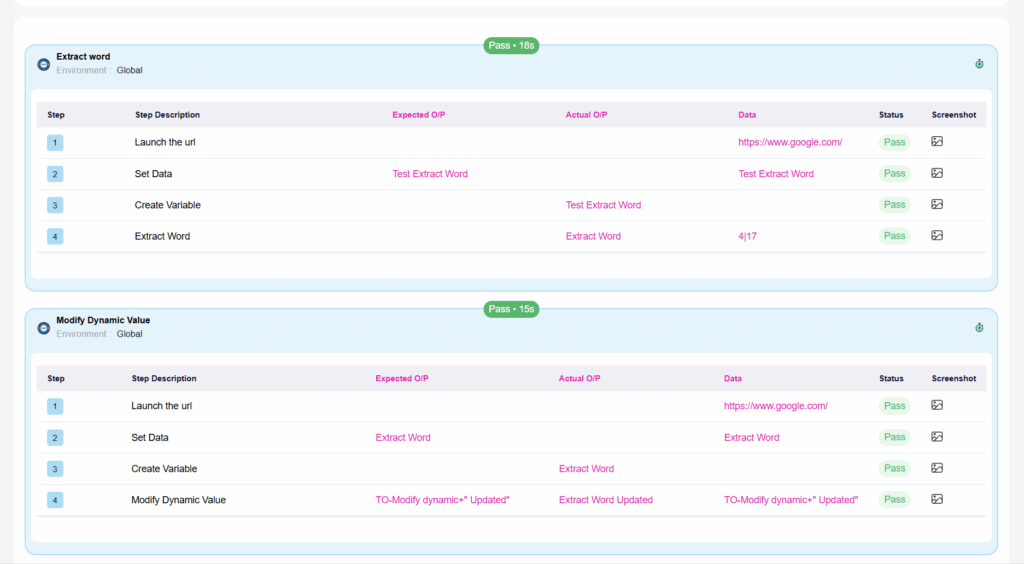
Previously, if you extracted a specific piece of text during a test—like grabbing an order ID or a dynamic OTP from a mobile app screen—that valuable data was trapped within that individual script. If the next step in your Test Orchestration workflow was a web script that needed to input that exact ID for validation, the data couldn’t make the jump. This limitation broke the chain in cross-platform end-to-end testing, forcing users to rely on static data or complicated external workarounds.
The Fix:
We have introduced the ability to extract words from one script and pass them dynamically as inputs to the next node in Test Orchestration. Now, when you use the “Extract word” feature and assign it to a variable (for instance, in a mobile script), you can configure that variable as an Output. You can then seamlessly map it directly to the Input of a dependent node (like a web script) downstream.
How will it help?
This update unlocks true, uninterrupted end-to-end testing across different platforms and script types.
- True Cross-Platform Flows: Easily create workflows that span platforms, such as generating a code on a mobile device and automatically verifying it on a web portal.
- Dynamic Validation: Your tests can now react to and utilize real-time, dynamically generated data on the fly, making your validations much more robust and realistic.
- Simplified Orchestration: Eliminate the need for messy API workarounds or external databases just to pass a simple string of text between your testing steps.
Unified Insights & Stability: Multi-Project Filtering and Smoother Reporting!
The Challenge:
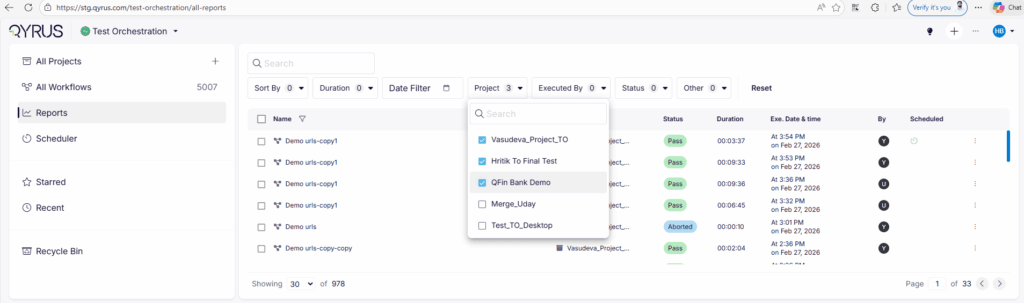
Previously, the Reports page presented two distinct usability hurdles. First, analyzing test results across different projects was a disjointed experience because you could only select one project at a time in the filters, forcing managers to stitch data together manually. Second, managing bulk executions caused platform instability; if you triggered multiple workflows and then attempted to abort them from the Reports page, the UI would continuously fluctuate and refresh erratically, making it incredibly difficult to interact with the system.
The Fix:
We have implemented a comprehensive UI/UX overhaul for the Reports page. We added full support for Multi-Project Selection in the filters section, allowing you to view and aggregate data across various projects simultaneously. Furthermore, we completely resolved the UI fluctuation bug, ensuring the page remains rock-solid and responsive even when processing abort commands for massive, multi-workflow executions.
How will it help?
This update transforms how you track, analyze, and manage quality across your organization.
- Holistic Visibility: Instantly view aggregated test execution metrics, passing rates, and statuses across your entire portfolio in a single, unified dashboard.
- Seamless Interaction: Enjoy a stable, glitch-free reporting interface, allowing you to confidently manage and abort bulk runs without frustrating UI disruptions.
- Eliminate Manual Work: Stop wasting time toggling between individual project dashboards or fighting with a jumpy screen to get the insights you need.
API Testing
Halt the Load: On-Demand Stop for Performance Tests!
The Challenge:
Previously, once an API performance test was initiated, it had to run its predetermined course. If you realized moments after clicking “Run” that you were targeting the wrong environment, or if the system under test began failing immediately, you were locked in. The test would continue generating massive, unnecessary load, wasting your execution resources and potentially causing severe disruptions or accidental outages on your backend services.
The Fix:
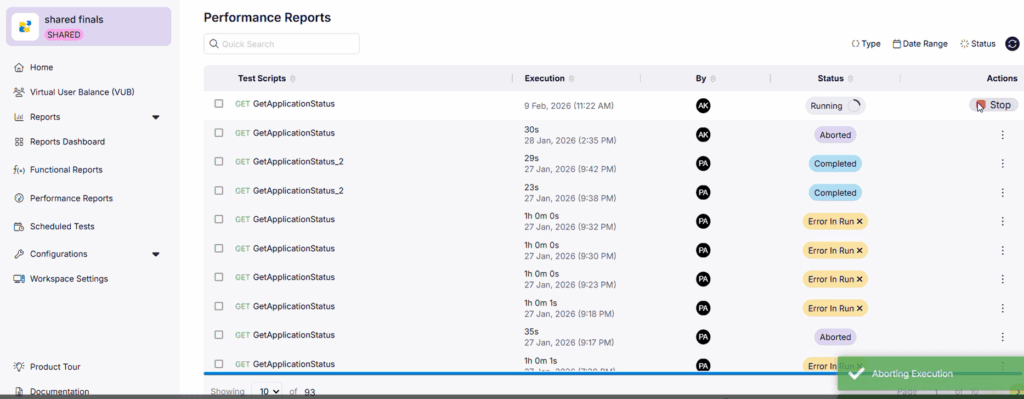
We have introduced a dedicated “STOP Execution” option specifically for active API performance tests, complete with precise state tracking.
- Targeted Visibility: The stop option is exclusively visible when the test is actively in the “Running” status. It is hidden during the “Run Initiated” or “Generating Reports” phases to prevent interrupting essential setup or teardown processes.
- Clear State Transitions: The moment you click “STOP Execution,” the report status immediately transitions to ABORTING. Once the underlying framework successfully spins down the virtual users and fully halts the process, the final status officially updates to Aborted.
How will it help?
This update gives you an essential, transparent emergency brake for your high-volume testing.
- Protect Your Systems: Instantly cut off the load if a test starts negatively impacting shared environments, databases, or third-party services.
- Save Resources: Stop wasting valuable execution minutes and concurrency slots on tests that are already known to be failing or misconfigured.
- Confident Control: The clear UI state changes eliminate guesswork, providing immediate visual confirmation that your stop command was received and successfully executed.
Closing the Loop: Automated Report Attachments for Jira!
The Challenge:
Previously, when an API test failed and a bug was logged in Jira, the resulting ticket often lacked immediate, actionable context. Developers would see that a test failed, but to understand why, they had to leave Jira, log into Qyrus, navigate to the specific project, and dig up the execution report to view the payloads, headers, and error messages. This constant context-switching slowed down the debugging process and created friction between QA and Development teams.
The Fix:
We have significantly enhanced our Jira integration to support the automatic attachment of execution reports. Now, when a Jira issue is created directly from a failed API test in Qyrus, the comprehensive test report is automatically generated and attached directly to the Jira ticket.
How will it help?
This update centralizes your debugging information where your developers already work.
- Context-Rich Tickets: Developers instantly receive all the necessary technical details—requests, responses, and validation failures—attached right to the bug report.
- Faster Bug Resolution: By eliminating the need to switch platforms and hunt for test data, your team can start fixing issues immediately.
- Streamlined Collaboration: It creates a single, undeniable source of truth within Jira, making communication between testers and developers much more efficient.
Flawless Data Prep: Reliable JSON Path Extraction for Pre-Requests!
The Challenge:
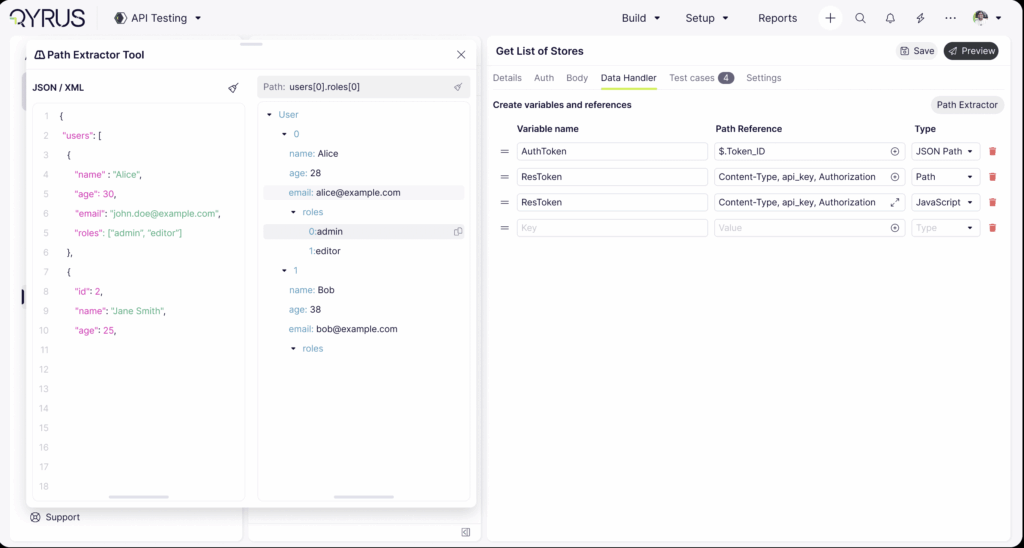
Setting up dynamic API tests often requires fetching and defining data before the main request even runs. Previously, when users tried to use the JSON Path extractor to pull specific values into Pre-Request variables, the system would sometimes fail to parse the payload correctly, resulting in an “undefined” value. This broken extraction caused subsequent API calls to fail unexpectedly—such as missing an authentication token or a critical ID—forcing users to spend time debugging test setups instead of the APIs themselves.
The Fix:
We have fully resolved the bug and enhanced the capabilities of the JSON path extractor specifically for Pre-Request variables. The parsing engine has been upgraded to accurately evaluate your JSON paths and correctly capture the intended data, completely eliminating the “undefined” variable issue.
How will it help?
This update ensures your API tests are built on a solid foundation from the very first step.
- Reliable Test Setup: Guarantee that your API requests always have the correct prerequisite data before they execute, eliminating false negatives.
- Dynamic Workflows: Confidently chain processes together, knowing that data extracted in the pre-request phase will be passed accurately to the main request.
- Reduced Troubleshooting: Stop wasting time investigating “undefined” variable errors and focus your energy on actual API validations.
Bridge the Gap: Seamlessly Pass Extracted Data Across Workflows!
The Challenge:
Previously, if you extracted a specific piece of text during a test—like grabbing an order ID or a dynamic OTP from a mobile app screen—that valuable data was trapped within that individual script. If the next step in your Test Orchestration workflow was a web script that needed to input that exact ID for validation, the data couldn’t make the jump. This limitation broke the chain in cross-platform end-to-end testing, forcing users to rely on static data or complicated external workarounds.
The Fix:
We have introduced the ability to extract words from one script and pass them dynamically as inputs to the next node in Test Orchestration. Now, when you use the “Extract word” feature and assign it to a variable (for instance, in a mobile script), you can configure that variable as an Output. You can then seamlessly map it directly to the Input of a dependent node (like a web script) downstream.
How will it help?
This update unlocks true, uninterrupted end-to-end testing across different platforms and script types.
- True Cross-Platform Flows: Easily create workflows that span platforms, such as generating a code on a mobile device and automatically verifying it on a web portal.
- Dynamic Validation: Your tests can now react to and utilize real-time, dynamically generated data on the fly, making your validations much more robust and realistic.
- Simplified Orchestration: Eliminate the need for messy API workarounds or external databases just to pass a simple string of text between your testing steps.
Unified Insights & Stability: Multi-Project Filtering and Smoother Reporting!
The Challenge:
Previously, the Reports page presented two distinct usability hurdles. First, analyzing test results across different projects was a disjointed experience because you could only select one project at a time in the filters, forcing managers to stitch data together manually. Second, managing bulk executions caused platform instability; if you triggered multiple workflows and then attempted to abort them from the Reports page, the UI would continuously fluctuate and refresh erratically, making it incredibly difficult to interact with the system.
The Fix:
We have implemented a comprehensive UI/UX overhaul for the Reports page. We added full support for Multi-Project Selection in the filters section, allowing you to view and aggregate data across various projects simultaneously. Furthermore, we completely resolved the UI fluctuation bug, ensuring the page remains rock-solid and responsive even when processing abort commands for massive, multi-workflow executions.
How will it help?
This update transforms how you track, analyze, and manage quality across your organization.
- Holistic Visibility: Instantly view aggregated test execution metrics, passing rates, and statuses across your entire portfolio in a single, unified dashboard.
- Seamless Interaction: Enjoy a stable, glitch-free reporting interface, allowing you to confidently manage and abort bulk runs without frustrating UI disruptions.
- Eliminate Manual Work: Stop wasting time toggling between individual project dashboards or fighting with a jumpy screen to get the insights you need.
Halt the Load: On-Demand Stop for Performance Tests!
The Challenge:
Previously, once an API performance test was initiated, it had to run its predetermined course. If you realized moments after clicking “Run” that you were targeting the wrong environment, or if the system under test began failing immediately, you were locked in. The test would continue generating massive, unnecessary load, wasting your execution resources and potentially causing severe disruptions or accidental outages on your backend services.
The Fix:
We have introduced a dedicated “STOP Execution” option specifically for active API performance tests, complete with precise state tracking.
- Targeted Visibility: The stop option is exclusively visible when the test is actively in the “Running” status. It is hidden during the “Run Initiated” or “Generating Reports” phases to prevent interrupting essential setup or teardown processes.
- Clear State Transitions: The moment you click “STOP Execution,” the report status immediately transitions to ABORTING. Once the underlying framework successfully spins down the virtual users and fully halts the process, the final status officially updates to Aborted.
How will it help?
This update gives you an essential, transparent emergency brake for your high-volume testing.
- Protect Your Systems: Instantly cut off the load if a test starts negatively impacting shared environments, databases, or third-party services.
- Save Resources: Stop wasting valuable execution minutes and concurrency slots on tests that are already known to be failing or misconfigured.
- Confident Control: The clear UI state changes eliminate guesswork, providing immediate visual confirmation that your stop command was received and successfully executed.
Closing the Loop: Automated Report Attachments for Jira!
The Challenge:
Previously, when an API test failed and a bug was logged in Jira, the resulting ticket often lacked immediate, actionable context. Developers would see that a test failed, but to understand why, they had to leave Jira, log into Qyrus, navigate to the specific project, and dig up the execution report to view the payloads, headers, and error messages. This constant context-switching slowed down the debugging process and created friction between QA and Development teams.
The Fix:
We have significantly enhanced our Jira integration to support the automatic attachment of execution reports. Now, when a Jira issue is created directly from a failed API test in Qyrus, the comprehensive test report is automatically generated and attached directly to the Jira ticket.
How will it help?
This update centralizes your debugging information where your developers already work.
- Context-Rich Tickets: Developers instantly receive all the necessary technical details—requests, responses, and validation failures—attached right to the bug report.
- Faster Bug Resolution: By eliminating the need to switch platforms and hunt for test data, your team can start fixing issues immediately.
- Streamlined Collaboration: It creates a single, undeniable source of truth within Jira, making communication between testers and developers much more efficient.
Flawless Data Prep: Reliable JSON Path Extraction for Pre-Requests!
The Challenge:
Setting up dynamic API tests often requires fetching and defining data before the main request even runs. Previously, when users tried to use the JSON Path extractor to pull specific values into Pre-Request variables, the system would sometimes fail to parse the payload correctly, resulting in an “undefined” value. This broken extraction caused subsequent API calls to fail unexpectedly—such as missing an authentication token or a critical ID—forcing users to spend time debugging test setups instead of the APIs themselves.
The Fix:
We have fully resolved the bug and enhanced the capabilities of the JSON path extractor specifically for Pre-Request variables. The parsing engine has been upgraded to accurately evaluate your JSON paths and correctly capture the intended data, completely eliminating the “undefined” variable issue.
How will it help?
This update ensures your API tests are built on a solid foundation from the very first step.
- Reliable Test Setup: Guarantee that your API requests always have the correct prerequisite data before they execute, eliminating false negatives.
- Dynamic Workflows: Confidently chain processes together, knowing that data extracted in the pre-request phase will be passed accurately to the main request.
- Reduced Troubleshooting: Stop wasting time investigating “undefined” variable errors and focus your energy on actual API validations.
Ready to Leverage March’s Innovations?
We are committed to providing a unified platform that not only adapts to your evolving needs but also streamlines your critical processes, empowering you to release high-quality software with greater speed and confidence.
Eager to explore how these advancements can transform your testing efforts? The best way to appreciate the Qyrus difference is to experience these new capabilities directly.
Ready to dive deeper or get started?
Book a personalized demo